Audio & Video
How to Convert iPhone Voice Memos to WAV on Mac (Batch)
You record in Voice Memos, move the files to your Mac to edit, and end up with M4A. Fine for storage, less fine when Audacity, Premiere, or Logic would rather have WAV. That handoff — iPhone to Mac to editor — is exactly where a fast batch conversion earns its keep.
Converleon turns a pile of clips into WAV in one go, M4A to WAV without re-uploading private audio anywhere.
Don't just rename the extension
Changing .m4a to .wav in Finder doesn't convert the audio data — it produces a file that may not open at all. You need real re-encoding to get a valid WAV for editing or archiving.
Heads up: never rename extensions to "convert." Run an actual conversion step so the file stays usable.
What you need
- A Mac on macOS 13.5 or later
- Converleon from the App Store
- Your Voice Memo files (synced via iCloud or AirDropped over)
Step by step
One long interview or fifty short clips — same process, and it batches.
1. Drop your memos. Find them in Finder and drag them onto the Converleon icon. You can mix M4A, MP3, or even video files in one drop.
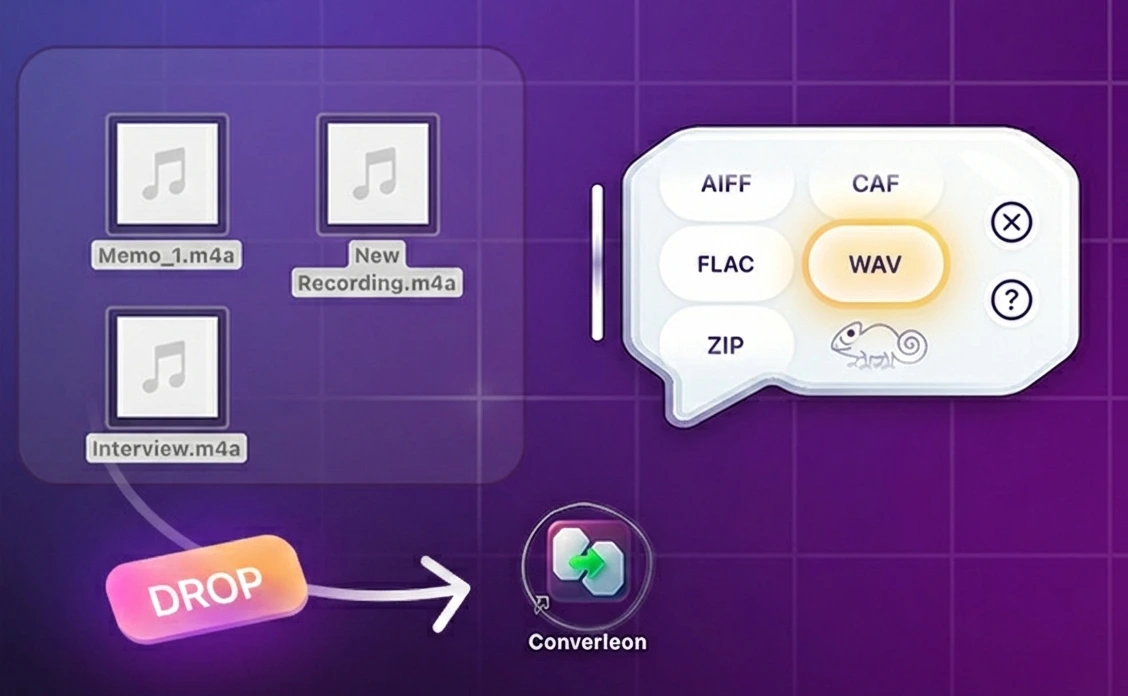
2. Choose WAV. Pick WAV in the bubble. It's uncompressed and lossless, which keeps edits, time-stretching, and processing predictable in professional tools.
3. Done. The new WAV files land in the same folder, ready for Logic, Audacity, or Premiere without compatibility errors.
A note for journalists and creators
Voice memos can hold sensitive interviews and private notes. Web converters need you to upload them; Converleon processes the files offline so raw recordings never leave your device — part of its local-only approach.
FAQ
Can I convert M4A to MP3? Converleon focuses on high-quality outputs and supports M4A, WAV, AIFF, FLAC, and CAF, where WAV is usually the preferred editing format. For M4A files that didn't come from Voice Memos, the M4A to WAV guide covers the general case.
Does it handle long recordings? Yes. There's no short-clip limit, so full lectures and interviews convert the same way.
What if my audio is inside a video? Then extract the audio track from the MOV or MP4 first, and export straight to WAV.
Wrapping up
Getting audio off an iPhone and into your editor should be simple. Batch-convert your memos to WAV and they're ready for production. If you also keep a FLAC library, converting FLAC to M4A or WAV is the same kind of job.
Download Converleon for Mac — prep recordings for editing, securely on-device.